Membership Rulebook
Overview
This page lists, for each member status, whether the person can get in, when it ends, and what happens to their money and quota. Use it when you answer questions from members.
For setup steps, see Membership Plans and Usage Quotas and Membership Setup Guide. For operations on the members list, see Member Management.
1. The three groups at a glance
| Group | Statuses | Entry | Member price / quota |
|---|---|---|---|
| Members | Active / Past due / Scheduled to cancel | ✓ | ✓ |
| Applying | Awaiting payment / Pending approval / Approved, awaiting payment | ✗ | ✗ |
| Ended | Cancelled / Expired / Force-cancelled / Rejected | ✗ | ✗ |
A member who is scheduled to cancel is a normal member until the end date. Even after they apply to cancel, entry and the member price on bookings work as usual until the end date.
2. Status list
| Status | Admin screen / member app label | When | Entry | Member price / quota | What happens next |
|---|---|---|---|---|---|
| Active | Active / Active | Paid, or using a free plan | ✓ | ✓ | The member cancels → Scheduled to cancel |
| Past due | Past Due / Payment overdue | The renewal payment is not confirmed (in the grace period) | ✓ | △ (below) | If paid → Active / If not paid → ends |
| Scheduled to cancel | Cancellation Scheduled / Cancelled (not renewing) | The member applied to cancel and is waiting for the end date | ✓ | ✓ | Cancelled on the end date / until then, the member can undo it |
| Awaiting payment | Pending Payment | Applied, before payment | ✗ | ✗ | Payment makes it Active / the member can withdraw |
| Pending approval | Pending Approval | Waiting for the facility's approval | ✗ | ✗ | Approved / Rejected / the member can withdraw |
| Approved, awaiting payment | Approved (Pending Payment) | Approved, or auto-approved for on-site payment, but not yet paid | ✗ (except an existing member mid plan change) | ✗ | Payment makes it Active / the member can withdraw. There is no deadline |
| Cancelled | Cancelled | The member cancelled or withdrew, or card billing was stopped | ✗ | ✗ | The person can join again |
| Expired | Expired | No on-site renewal, and the grace period ran out | ✗ | ✗ | Recording a receipt at the front desk makes it Active again |
| Force-cancelled | Revoked / Suspended | The facility ended the membership (including blacklisting and retiring a plan) | ✗ | ✗ | — |
| Rejected | Rejected | Declined at review. Also when the facility ends an application (force cancel, blacklist, retiring a plan) | ✗ | ✗ | — |
Past due (△): entry works. The free quota can be used only for bookings up to the end of the current period (in the on-site grace period that period has already ended, so new bookings get no free quota)
One person can have only one "membership that has not ended" at the same facility. If an application is left as "Approved, awaiting payment", the person cannot apply for another plan. Ask them to withdraw it, or guide them to pay
When you approve a plan change to a paid plan, the member becomes "Approved, awaiting payment" until they pay. In the meantime, their entry permission moves over to the new plan, but the member price and quota cannot be used
3. How joining works
| Payment method / review | Flow |
|---|---|
| Online payment, pay first, auto-approve | Apply → pay by card → Active |
| Online payment, pay first, with review | Apply and pay → Pending approval → facility approves → Active |
| Online payment, review first | Apply → Pending approval → approve (payment email is sent) → member pays → Active |
| On-site payment, with review | Apply → Pending approval → facility approves → record the receipt at the front desk → Active |
| On-site payment, auto-approve | Apply → record the receipt at the front desk → Active |
| Free plan | Apply → (approve, if review is on) → Active |
- Monthly periods start on the 1st of each month at 00:00 (facility time)
- Monthly online payment charges the first month prorated by the day (yearly plans are not prorated). On-site payment records whatever amount is received at the front desk (the facility decides there whether to prorate), and the period runs to the end of that month. The quota is the full amount even in the first month
- A blacklisted person cannot apply (the reason is not shown)
- Bank transfer is not supported
4. When a payment is late
On-site payment (example: the October period ends 10/31, grace 7 days)
| Date | Status | Entry |
|---|---|---|
| Until 10/31 | Active | ✓ |
| 11/1–11/7 | Past due (grace) | ✓ |
| From 11/8 | Expired | ✗ (the key is removed) |
| Any time | Receipt recorded at the front desk | → Active again |
Grace is 0–31 days per plan (7 days by default). With 0 days, the member expires as soon as the month changes.
Online payment
| Event | Status | Entry |
|---|---|---|
| The renewal charge fails | Past due | ✓ |
| Stripe's retry succeeds | Back to Active | ✓ |
| Stripe stops retrying | Cancelled | ✗ |
- The length of the grace period is set in Stripe (about 2–3 weeks by default). Set Stripe's "If a payment fails" to "Cancel the subscription" or "Mark the subscription as unpaid". If you choose to leave it as is, the membership does not end
- A free plan set to monthly or yearly billing does not renew automatically. At the end of the period it goes Past due → Expired. On a plan whose payment method is online payment, you also cannot renew this free plan at the front desk. For a free plan that should last indefinitely, set it to "No expiry"
5. Cancelling (by the member in the member app)
This example is a monthly plan with a cancellation deadline day of the 20th of each month (the default). An application made on the deadline day itself counts as "by the deadline day".
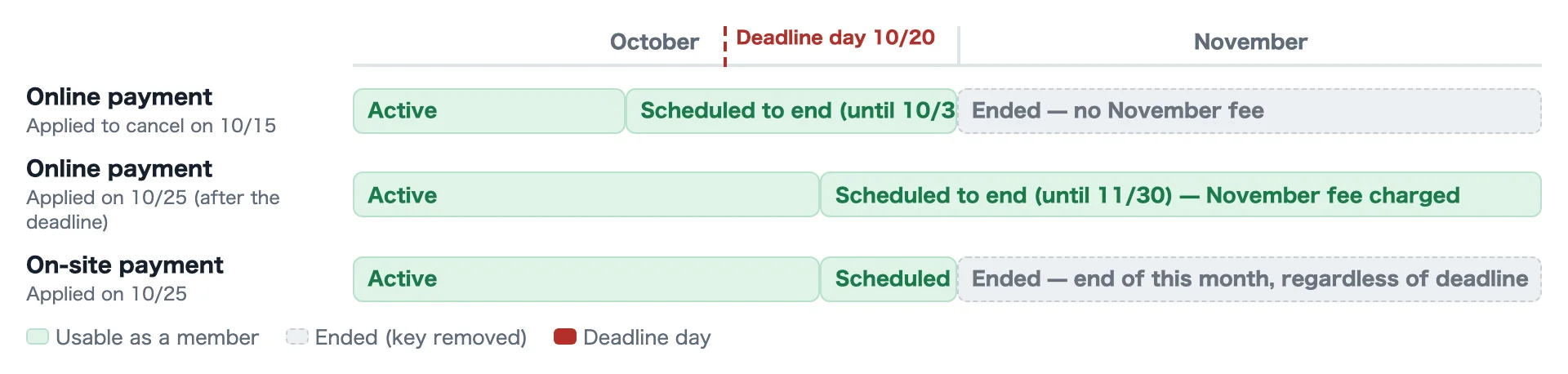
| Day the member applied to cancel | Online payment | On-site payment |
|---|---|---|
| 10/15 (before the deadline day) | Usable until 10/31. The November fee is not charged | Usable until 10/31 |
| 10/20 (on the deadline day) | Usable until 10/31 | Usable until 10/31 |
| 10/25 (after the deadline day) | Usable until 11/30. The November fee will be charged | Usable until 10/31 (the deadline day does not matter) |
| Current status / plan | When it ends after cancelling |
|---|---|
| Active, online payment (monthly) | By the deadline day → the end of this month. After the deadline day → the end of next month (next month's fee is charged) |
| Active, online payment (yearly) | The only check is whether the day of the month is on or before the monthly deadline day (default the 20th). Applying from the 21st charges the next year even when the current year has months left, and the membership continues until its end |
| Active, on-site payment | The end of the current period, regardless of the deadline day |
| Active, free plan with no expiry | Ends immediately |
| Past due | Ends immediately (Stripe billing is also stopped) |
- "The end of this month" means until 00:00 on the 1st of the next month, so the member can use the last day in full
- Reservations dated after the end date that are free because of the member benefit are cancelled when the membership ends (within 15 minutes; the member is told on the cancellation confirmation screen). While a membership is being paid for, or is approved and awaiting payment (such as a plan change), they are kept for 7 days. Stays that have already started, and reservations where money moved (such as paid options), stay as they are. Handle them at the facility if needed
6. Withdrawing an application and undoing a scheduled cancellation
| What the member wants | The member can do it | The member cannot do it (the screen says "Please contact the facility") |
|---|---|---|
| Withdraw an application (awaiting payment / pending approval / approved, awaiting payment) | Applications before payment. After withdrawing, they can apply for another plan right away | Already paid (including being processed) / waiting for a plan change of an existing member / when the payment status cannot be confirmed |
| Undo a scheduled cancellation (only before the end date) | A cancellation the member applied for. The scheduled end in Stripe is also removed | An end decided by the facility / a retired plan / a blacklisted person |
No "membership ended" notice is sent when an application is withdrawn. Any permissions the person holds in another role, such as staff, do not change.
7. Quota
A booking uses the quota of the month of the date of use. It does not use the month when the booking was made.

| Action | What happens to the quota |
|---|---|
| On 10/10, book for 11/15 | Uses 1 from the November quota (the October quota does not go down) |
| Cancel that booking inside the refund window | 1 returns to the November quota |
| Cancel that booking outside the refund window, or after it starts | Does not return |
| Change the date from 11/15 to 10/28 | Uses 1 from the October quota, and 1 returns to the November quota |
| Quota | Period it is counted in |
|---|---|
| Monthly visits | The month of the visit |
| Daily hours | Recorded on the day of check-out |
| Monthly bookings / booking hours | The month of the booking's date of use |
| Concurrent bookings | The number of future bookings the member holds now |
Quota returns on cancellation only inside the refund window
Whether the quota returns on cancellation follows the same rule as ticket books.
- It returns only when the member cancels during the period in which the reservation plan's cancellation policy gives a full refund (a reservation plan with no cancellation policy returns it any time before the start)
- It does not return when they cancel during a period with a cancellation fee (whether 50% or 100%), or after the start time
- The same applies to a change that shortens the usage time on a plan counted by hours. If they shorten it outside the refund window, the original hours are still counted
- The cancellation confirmation on the booking screen shows "Member quota: returns / does not return"
- The "Cancel" button on the admin reservation details follows the same rule (the same treatment as cancellation fees and ticket books). If you change the status to "Cancelled", or if the facility declined the application, it expired unpaid, or the payment was cancelled, the quota returns
Other
- 0 or not set means "no limit". Months are calendar months in facility time (yearly plans are also counted by month)
- When the quota is exceeded, the plan chooses "Block" or "Charge the normal plan price" (there is no separate per-overage fee). "Charge the normal plan price" only affects bookings. Check-ins beyond the visit or daily-hours limit go through with no extra charge; choose "Block" to limit them
- If the month of the new date is full, the date cannot be changed, and the original booking and quota stay as they are
- A member who is scheduled to cancel cannot use the free quota for bookings on days after the end date. A past-due member can use it up to the end of the current period, and an active member for the current period and one period ahead
- A stay that began as a member is settled as a member even if it crosses the end date
8. Refunds
| Case | Automatic refund | Note |
|---|---|---|
| Rejecting an application that has been paid | ✗ | Stripe billing is stopped. Refund in the Stripe Dashboard |
| The member cancels | ✗ | The member can use it until the end of the period they paid for |
| Force cancel | ✗ | Billing stops. Refund in the Stripe Dashboard |
| Withdrawing an application that has been paid | ✗ | The member cannot do this. The facility decides how to handle it |
| On-site payment | ✗ | The facility refunds the member directly |
9. Force cancel, rejection and retiring a plan
Force cancel (from the members list)
- Stop Stripe billing (online-payment members only. Always done first)
- If it stopped → Force-cancelled. The key is removed
- If it did not stop → nothing is changed, and the reason is shown (run it again / check the payment settings / check the Stripe account)
- Facility owners, organization owners and platform administrators can do this from any status, as long as the membership has not ended
- Ending an application that never became a membership (awaiting payment, pending approval, approved awaiting payment) is recorded as "Rejected" (no ending notice is sent)
- The state "already cancelled in UnlockOS but Stripe keeps billing" does not happen
- A plan-change request that is still pending is also withdrawn
- You cannot change a member's plan directly from the admin screen. Ask the member to request a plan change
Rejection and retiring a plan
| Action | What happens |
|---|---|
| Reject (Pending Approvals tab) | Becomes Rejected, and the reason is sent by email. If it has been paid, Stripe billing is stopped (refund in the Stripe Dashboard). An application left "Approved, awaiting payment" without being paid can be rejected from the Awaiting payment tab (not an existing member's plan change) |
| Retire a plan | A plan that has members cannot be retired. Only if someone joined just before, that member is force-cancelled (rejected if still an application). Anyone whose Stripe billing could not be stopped is left as they are |
10. Blacklist
| What the blacklisted person tries to do | Stopped |
|---|---|
| A new membership application | ✓ |
| Changing plans / undoing a scheduled cancellation | ✓ |
| Check-in (from any entrance, checked before a key is issued or a payment is taken) | ✓ |
| A new booking on the booking site | ✓ |
| Unlocking or showing the key again for a person who is already staying when they are registered | ✗ (stops from the next entry) |
| How they were registered | Current membership |
|---|---|
| From any screen (members list, Blacklist screen, member details) | Registered first, then all of the person's memberships in the ban's scope (whole organization / this facility) are ended. Members become Force-cancelled, applications Rejected. Stripe billing is stopped first, and a membership whose billing cannot be stopped is not ended (the screen says so; force cancel it from the members list to retry). The person is not notified |
| Only "Add to Blacklist" from the members list | All of the person's roles at this facility (including staff roles) are also removed |
When the check cannot be made (it cannot be read temporarily), the person is not let through. Front desk and staff cannot let them through as an exception either.
11. When the key (entry permission) is removed
The key is given when the person becomes a member (when payment or approval is done). People who are still applying do not have one.
| Trigger | The key is removed |
|---|---|
| Force cancel / blacklist | Immediately |
| Cancelling while Past due / cancelling a no-expiry plan | Immediately |
| The member's own cancellation (scheduled to cancel) | On the end date (on-site and free: within 15 minutes of the end date; card: when Stripe's notice that it has ended arrives) |
| No on-site renewal | When the grace period runs out (after 7 days by default) |
| Stripe stops retrying | When Stripe's notice that it has ended arrives |
| Plan change approved | Not removed (moved over to the new plan's permissions) |
| Application withdrawn / rejected | There was no key to begin with (staff permissions and similar do not change) |
"Immediately" refers to the entry permission. A key already issued for a stay in progress stays valid until checkout.
12. Notifications
| Event | Member | Owner | Default |
|---|---|---|---|
| A member joins | ✓ | ✓ | On |
| Approval that leaves the application awaiting payment (with guidance for the chosen payment method) / rejection (with the reason) | ✓ | — | Always sent (an approval that activates straight away sends only "A member joins") |
| A membership application (pending approval) | — | ✓ | Off |
| A cancellation was received | ✓ | ✓ | Off |
| A membership ended (the end date of a scheduled cancellation / force cancel / Stripe stopped billing / plan retired) | ✓ | ✓ | Off |
| A membership fee payment failed | ✓ | ✓ | Off |
| Application withdrawn / ended through the blacklist / the monthly on-site expiry | — | — | Not sent |
- For notifications that are off by default, check the wording in Notification Workflow Help before you turn them on
- Emails to members are sent with the facility name as the sender
13. Frequently asked questions
Q: The member cancelled but was charged for next month
This happens when a member on online payment cancels after the deadline day. They can use the membership as a member until the end of next month.
Q: The member applied to cancel and can no longer get in
A member who is scheduled to cancel is a member until the end date. Check that the end date has not passed.
Q: The member wants to keep the membership after all
Before the end date, the member can undo the scheduled cancellation in the member app.
Q: The card is stopped and they cannot pay. They want to quit
Even when the status is Past due, the member can cancel right away in the member app.
Q: The member wants to cancel an application
Before payment, they can withdraw it in the member app. If they have already paid, handle it at the facility.
Q: Next month's booking reduced this month's quota
It does not. A booking uses the quota of the month of the date of use.
Q: The member cancelled but the quota did not return
The cancellation was outside the refund window, or after the start time. As with ticket books, the quota returns only when the cancellation is made during the period in which the reservation plan's cancellation policy gives a full refund.
Q: Next month's booking disappeared after the member cancelled
A booking that was free because of the member benefit is cancelled when the membership ends. If the person keeps using the facility, they need to book again (at the regular price).
Q: The member forgot the on-site renewal
They can get in during the grace period. Even after the membership expires, recording a receipt at the front desk brings it back.
Q: Billing continues after a force cancel
It does not happen with force cancel, blacklisting or retiring a plan (a membership whose Stripe billing cannot be stopped is not ended). If blacklisting says the Stripe cancellation failed, force cancel the member from the members list to retry.
Related Pages
- Membership Plans and Usage Quotas
- Membership Setup Guide
- Member Management
- Blacklist Management
- Notification Workflow Help
Last updated: 2026-10-04 — New page (#4844). Reflects cancelling free reservations after the membership ends (#4873) and returning quota on cancellation only inside the refund window (#4871). Unified endings (#4853: ending an application records Rejected, a ban from any screen ends memberships, an unpaid approved application can be rejected)